This software was checked for viruses and was found to contain no viruses.
Click here
to see antivirus report.
Review
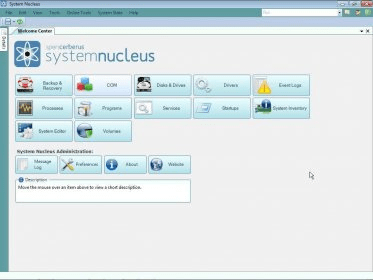
Spencerberus System Nucleus is an all-in-one tool to manage your system’s resources. Through a very easy-to-use interface, this package provides access to features that will allow you to back up and restore the registry hives, the event logs, and the drivers installed in your system, to view and edit .NET and COM+ applications, to view and check your hard disks and other drives, to know more about your drivers and event logs, to view and manage active processes, to see an enhanced list of the programs installed in your system (with links to the developers’ sites), to view and manage your active services, to manage the programs, drivers, and codecs that launch at startup, to perform a hardware inventory, and, finally, to edit your system’s preferences.
The program allows you to investigate about every component, codec or program installed in your system, giving you links to Internet sites where you can grab even more information. You can also update your drivers using these links.
Spencerberus System Nucleus runs under Windows 7, but you must set it to run with Administrator privileges.
It is free.
It gives you more control over the usage of your system's resources.
None.
Reviewed by: Daniel Ángel Romero
Reviewer rating:
Reviewed: Last year
What's new in version 2.3
Version 2.3.0:
[+] System Editor: add & delete Environment Variables
[+] Backup & Recovery: added option to enable System Restore if disabled
[+] Drivers: added link to Backup functionality in toolbar & context menu
[+] Services & Drivers: disabled missing file prompt by default & added toolbar button for on-demand display of missing files
[+] System Editor: options to create restore point and/or backup registry before saving
[*] Message Logs: selecting large number of entries to display was locking up the interface for an extended time period
[*] Online Tools menu combined with Tools to reduce clutter & allow display of all menu items when window is resized down
[*] Replaced old data binding control that had a memory leak
[*] Services & Drivers: notice of missing Services & Drivers now only displayed on first load, so does not interfere with auto refresh
[*] Services: first displayed service is selected by default
[-] Actions applied from main toolbar were causing an error when Details panel selected
[-] Event Log: correct set of web resource links now displayed in Details when switcing from another view
[-] Message Log: filter bar display styles were not taking effect
[-] Message Logs: filter toolbar display options were not in sync
[-] Pressing a key with a data grid selected will jump to the first record with a value in the sort column that begins with the key's character
[-] Run command box resized to fit on menu when window is sized down
[-] Screensaver settings from system tray menu were not taking effect
[-] Services: auto refresh could become disabled if refresh occurred while changes to services were in progress
[-] Services: fixed problem changing startup mode to Automatic from task pane
[-] Services: selection now maintained after applying filter
[-] Services: service name in Details was not always correct when switching from another view
[-] Services: task pane now fully visible
[-] System Editor: AutoRun Disabled property change wasn't being applied
[-] System Editor: Visual Effects setting changes were not taking effect & caused an error
[-] System Editor: categories only available in Advanced mode could be displayed initially even when Advanced mode was not enabled
[-] System Editor: changes to Environment Variables were not being saved
